Zipcar
- 4.0
- Rating
- 1.00M
- Installs
- Free
- Price

 Analysis by App-foxy
Getting around a city without owning a car can be surprisingly awkward. Public transport may not reach the right place, taxis can feel excessive for a short errand, and traditional rental cars often make a simple trip feel like a full-day commitment. I found Zipcar most useful in that middle ground: when I needed a car nearby for a practical journey and wanted to organize the trip from my phone rather than visit a rental desk.
This is a free Maps & Navigation app from Zipcar, built around finding and using shared cars by the hour or day. That description sounds simple, but the real value depends heavily on where you live, how close a suitable car is, and whether your journey is short enough to justify car sharing. I would not treat it as a universal replacement for buses, trains, taxis, or owning a vehicle. I see it as a focused tool for occasional access to a car.
How Zipcar fits into everyday travel
My first impression is that the app makes the most sense when I already know why I need a car. A map-based search is more useful when I am thinking, “I need to carry something across town this afternoon,” rather than simply browsing for a way to get somewhere. The nearby-car approach helps connect a specific trip with a vehicle, instead of forcing me to compare every transport option from scratch.
You May Also Like

 Blood Strike: 2.5 Anniversary
Blood Strike’s Loadouts Turn Every Drop Into a Tactical Gamble
A close look at Blood Strike’s custom loadouts: how fast access to signature weapons reshapes its battle royale rhythm, rewards preparation, and narrows the gap between fights.

 Pandora - Music & Podcasts
Pandora’s Music Is Easy to Start, but Harder to Recover
Pandora’s strength is its low-effort path from a seed to a station. Its weak spot is how much confidence it asks you to place in connection, setup, and quiet recovery.

 8 Ball Pool
 Is Built on Rivalries, Rematches, and Routine
A close look at the rivalries, rematches, shared routines, and unanswered safety questions that turn a quick pool match into a persistent mobile community.

 Samsung Music
’s Quiet Strength Is Playing What You Already Own
Its reach comes less from spectacle than from dependable access to a personal library. That simplicity is both the app’s strongest retention engine and its ceiling.

 AccuWeather: Weather Radar
AccuWeather Review: A Quick, Clear Forecast for Everyday Decisions
For everyday plans, the best forecast is the one you can understand quickly. AccuWeather makes rain timing, radar, and local conditions easy to act on, with a few trade-offs.

 Hill Climb Racing
Why Hill Climb Racing Still Turns Crashes Into One More Run
A tiny car, a bumpy hill and one more upgrade: Hill Climb Racing keeps resurfacing because its simple chaos makes every near-miss feel personal.
More From Our News Desk



The app is aimed at people who want to drive a shared vehicle for a limited period. That makes it different from navigation apps that only guide me after I have found transportation. It is also different from ride-hailing, where another person drives, and from ordinary car rental, where the process is usually organized around a longer rental period and a dedicated rental location.
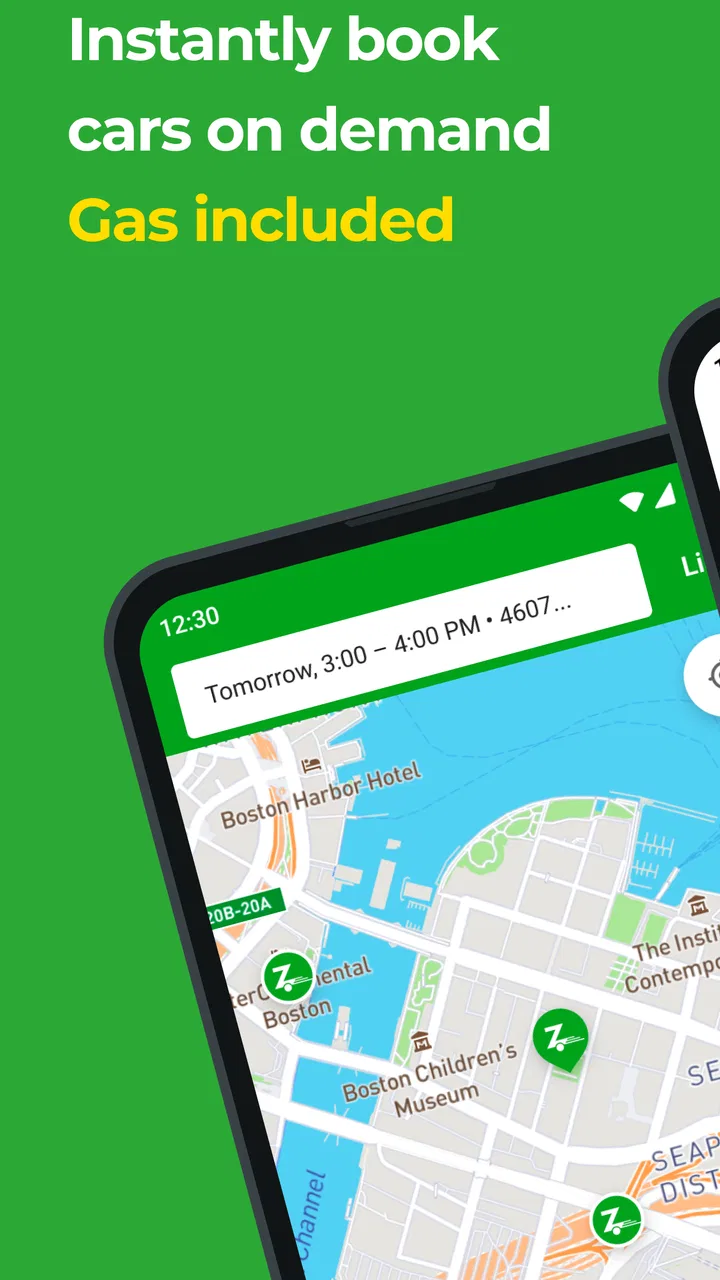
Because the service is built around cars near me, the map is central to the experience. Location matters more here than it does in a typical route-planning app. A nearby vehicle can make the difference between a convenient trip and one that is not worth the effort. I learned to judge the walking distance to the car before thinking about the driving distance to my destination.
That distinction is easy to overlook. A car that appears close on a city map may still be inconvenient if I am carrying bags, traveling with a child, or starting from a neighborhood with difficult crossings. In practice, the best vehicle is not always the one with the shortest apparent distance. It is the one that fits the whole journey from my door to the car and then from the parking area to the final destination.
The app is free to install, which makes trying the interface low-risk. However, free access to the app should not be confused with free driving. The application is the entry point to a car-sharing service, so the financial decision concerns the trip and the service arrangement rather than the download itself. I would check the actual booking details carefully before committing to a journey.
That is an important value distinction. Someone may see a free app and assume it is a no-cost alternative to public transport or a private car. It is not. The free download gives me access to the service’s mobile experience, while the usefulness of the service depends on the cost and conditions attached to the car I choose. I would evaluate each planned trip on its own rather than assume that one transport method is always cheapest.
A realistic errand where it makes sense
Imagine I am moving a flat-packed shelf from a shop to my apartment. Walking is unrealistic, public transport may be uncomfortable with a large package, and a taxi may not be suitable for carrying it. If a Zipcar is available near me, I can use the app to look for a vehicle, plan a short driving period, collect the item, and return the car according to the service’s instructions.
That scenario shows the app’s strongest practical role. I am not paying for a driver to wait while I shop, and I am not committing to keeping a rental car for several days. I get a self-drive option for a defined task. The trade-off is that I must handle the entire process myself: reaching the car, checking that I have selected the right vehicle, driving responsibly, and completing the return correctly.
Another good use is a day when several stops are spread across an area that public transport serves poorly. I might visit a storage unit, collect supplies, and see someone outside the city center. In that case, a shared car can reduce transfers and make the schedule more flexible. The benefit is not simply speed; it is the ability to carry items and change the order of stops without waiting for each connection.
For a single central-city trip, I may prefer walking, cycling, or rail. If parking is difficult and the destination is already well served by transit, the car adds responsibility without adding much convenience. Zipcar becomes more compelling when the journey involves luggage, multiple stops, awkward timing, or a location where other options are limited.
What the app does better than usual alternatives
Compared with an ordinary car-rental app, Zipcar’s shared-car model is better suited to spontaneous local errands and shorter periods of use. I do not need to think only in terms of a conventional rental counter or a multi-day holiday booking. The nearby-car concept is particularly attractive for city residents who occasionally need a vehicle but do not want the ongoing costs and maintenance of ownership.
Compared with ride-hailing, the main difference is control. I drive myself, so I can make several stops, carry belongings, and avoid explaining a complicated itinerary to a driver. That freedom matters for errands. On the other hand, ride-hailing is easier when I do not want to drive, search for parking, or take responsibility for the vehicle.
Compared with public transport, the app offers flexibility rather than a fixed route. I can reach places that are inconvenient by bus or train and carry more with me. Public transport remains the better choice when the route is direct, parking is expensive, or I want to read or work during the journey instead of concentrating on traffic.
Compared with navigation-only apps, Zipcar is more connected to the actual mobility decision. A navigation app can tell me how to reach a destination, but it will not by itself solve the problem of obtaining a suitable car. Zipcar is valuable when the question is not merely “Which route should I take?” but “Can I access a car near me for this particular job?”
Small workflow decisions that improve the experience
I would begin by searching before the trip becomes urgent. The nearby-car model rewards a little planning because the most convenient vehicle may not be available at the exact moment I need it. Looking ahead also gives me time to compare walking distance, departure time, and the practical demands of the journey instead of accepting the first option under pressure.
A useful habit is to plan the return before starting the drive. With shared cars, the end of the trip matters as much as the beginning. I would think about where I expect to finish, whether I need extra time for loading or unloading, and whether the destination could create a delay. A tight schedule can turn a simple booking into a stressful one if traffic or parking takes longer than expected.
I would also keep the app available while traveling, rather than treating it as something I open only once. A car-sharing journey has more stages than a normal map search: finding the vehicle, beginning the use period, driving, and completing the return. Keeping the phone charged and allowing time for each stage is a basic but important safeguard.
Another non-obvious trade-off is that the closest car may not be the best value for the whole journey. A slightly farther vehicle could be more practical if it makes the destination easier to reach or reduces the risk of a rushed return. I would compare the complete route rather than choosing only by the first map marker I see.
I would photograph or note the vehicle’s condition at the start if the service’s process allows or requests that, and I would follow every in-app instruction carefully. This is not a reason to avoid the app; it is simply part of using a shared vehicle responsibly. When several people use the same cars, careful handover habits protect both the next driver and me.
Where the value becomes less convincing
The app cannot solve a weak local supply of cars. If the map shows vehicles too far away, unsuitable for my needs, or unavailable at the right time, the service loses much of its appeal. This is the biggest limitation of a location-dependent car-sharing tool: the experience can be excellent in one neighborhood and inconvenient in another.
I also would not choose it for every long journey. For a trip that lasts most of a day or extends over several days, a traditional rental may be easier to compare and organize. For a quick ride where I do not need to carry anything, a taxi or ride-hailing service may involve less effort because I can avoid driving and parking.
There is also a mental cost that is easy to ignore. I have to think about the vehicle, the timing, the route, and the return, rather than simply stepping into a bus or letting someone else drive. That responsibility is worthwhile when the car solves a real problem, but it can feel like unnecessary administration for an uncomplicated trip.
People who need a guaranteed vehicle at a precise time should be especially cautious about relying on a nearby shared car without a backup plan. A delayed appointment, an unexpected traffic problem, or a longer-than-expected errand can make the schedule fragile. I would leave a reasonable buffer and avoid using the service for an appointment where arriving late would have serious consequences.
The app is also not the right choice for someone who wants a permanent replacement for a private vehicle. It provides access when a suitable car is available, but it does not remove the need to plan trips. Families with frequent daily driving, people transporting bulky equipment regularly, or commuters with a fixed route may find ownership, a long-term rental arrangement, or public transport more predictable.
Who is most likely to get real value?
I think the strongest audience is an urban resident who does not drive every day but occasionally needs a car. This person may already walk or use public transport for routine journeys and only need a vehicle for shopping, visiting an outlying area, moving belongings, or handling several stops. For that pattern, the app can fill a genuine gap without requiring a private car to sit unused most of the time.
It can also suit visitors or temporary residents who need self-drive access for a local task rather than a conventional holiday rental. The key question is whether a suitable vehicle is close enough and whether the booking terms fit the planned use. I would not choose it solely because the app is free; I would choose it because the car-sharing format matches the journey.
People who already know their city well may get more from it than someone unfamiliar with the area. Understanding parking, traffic, neighborhood layouts, and realistic walking distances makes it easier to select a useful car. New users should spend time learning the process before attempting a complicated trip with luggage or a strict deadline.
The app is available to an Everyone audience, and its long presence in the market suggests that it is not a brand-new experiment. It was released in March 2011, and the current version is 10.02.00. On Android, the listed minimum operating system is Android 7.0, so anyone using an older phone should check compatibility before planning around it.
Its scale is also reassuring for people who prefer established services: it has passed one million installs, with an average rating of 4.0 from around fifty-one thousand ratings and roughly fifteen thousand written reviews. I would read that as evidence of broad use rather than a guarantee that every local experience will be smooth. Availability and convenience still depend on the place and the individual trip.
What I would check before committing
Before planning an important journey, I would confirm that the map actually shows a workable car near my starting point. I would then consider the walking route, the size of anything I need to carry, the likely duration of the errand, and how much flexibility I have if the trip takes longer than expected.
I would also separate the app decision from the transport decision. Installing Zipcar costs nothing, but using a car is a paid travel choice whose value depends on the booking details and the alternatives available to me. If a train is direct and inexpensive, or if a ride-hailing trip avoids a difficult parking situation, the shared car may not be the sensible option that day.
For a first attempt, I would choose a simple trip with generous timing. That lets me understand the local vehicle-search experience and the return process without adding a deadline or a complicated route. Once I know how well the service fits my area, I can decide whether it is reliable enough for more demanding errands.
I would skip it when I need a driver, when I cannot tolerate any uncertainty around vehicle availability, or when the destination is easier by public transport. I would also look elsewhere for a longer holiday rental or a journey requiring specialized vehicle features that may not be available in the nearby shared-car selection.
My verdict on the free app and the paid journey
Zipcar is worth trying if you occasionally need a car and live somewhere with convenient nearby availability. The free app provides a practical way to explore that option, and the car-sharing format can be more flexible than public transport, less hands-on than ownership, and better suited to local errands than a conventional rental.
My recommendation is conditional rather than automatic. The app delivers the most value when I have a clear self-drive need, several stops, items to carry, or a destination that transit serves poorly. It delivers less value for simple city journeys, tight appointments, routine commuting, or long rentals where another option may be easier to budget and organize.
In the end, I would judge it by one question: does a nearby shared car make this specific trip simpler after I include the time to reach it, drive, park, and return it? If the answer is yes, Zipcar can be a genuinely useful part of a city travel toolkit. If the answer is no, the fact that the app itself is free is not enough reason to choose it.
FAQs for Zipcar
01What is Zipcar and how does it work?
Zipcar is a car-sharing service that allows members to rent cars by the hour or day. After signing up and receiving a Zipcard, members can reserve a vehicle through the app or website, unlock it with their card, and drive. It's ideal for those who need occasional car use without the costs of ownership.
02What are the requirements to become a Zipcar member?
To join Zipcar, you must be at least 21 years old (18 for students at affiliated universities) and possess a valid driver's license. The application involves a driving record check, and international drivers are welcomed, provided they meet the criteria. Membership fees apply, and a Zipcard will be mailed to you after approval.
03How does Zipcar handle fuel and insurance?
Fuel and insurance are included in the rental cost. Each Zipcar comes with a fuel card located inside the vehicle for refueling at no extra charge. Insurance covers up to the legal minimum, with options to purchase additional coverage. Always check the fuel level before returning the car to avoid penalties.
04Can I take Zipcar on long trips or one-way rentals?
Zipcar is primarily designed for short trips within a city, and most reservations require returning the car to its original location. Long-distance or one-way trips are generally not supported. However, specific Zipcar locations may offer different options, so it's best to check availability in your area.
05What are the costs associated with using Zipcar?
Zipcar costs include an annual or monthly membership fee and a rental fee charged by the hour or day. Rates vary based on location and vehicle type. Additional costs may arise from late returns, refueling penalties, or extending reservations. All costs are transparent during the booking process, allowing for easy budgeting.
Pros
- Convenient car access in urban areas.
- Hourly and daily rental options available.
- Fuel and insurance included in rates.
- User-friendly app interface.
- Wide variety of vehicles to choose from.
Cons
- Membership required for access.
- Limited availability in rural areas.
- Additional fees for late returns.
- App occasionally crashes or lags.
- Requires advance booking for popular times.

Zipcar
Gallery